 Fenestration
 Local Builders
 Builders' Merchants
 Architects & Specifiers
 House Builders
 Main Contractors
 Lead Generation
 Direct Marketing
 Marketing Reports
 Salestracker CRM
 STEM Email Marketing
 Mobile CRM
 Software Features
 Market Overview
 FAQs
FAQs Downloads
 GDPR
GDPR Our History
 Company News
 Careers
 Book a Demo
 Contact Us
Document Manager

Salestracker Document Manager is a feature available exclusively to users subscribed to the full CRM version of Salestracker. If you’re using the data-only version, this functionality will not be available and the steps in this guide will not apply.
The Document Manager allows CRM users to locate and manage documents that have been uploaded to Salestracker. To access it, hover over the Track Activity option in the main navigation menu, then click on Documents. This opens the interface where you can apply filters, view file details, and if you have the correct permissions, delete files.
This page is broken into two parts:
-
- The top of the page features filters you can apply to filter down uploaded documents.
- The lower half of the page features the documents themselves.
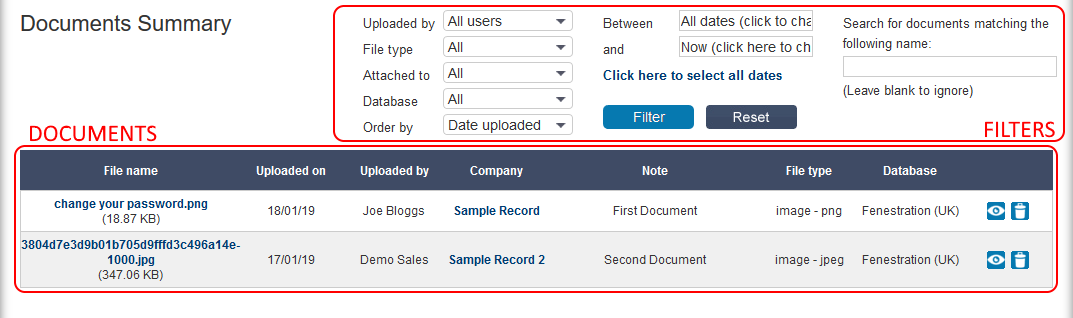
The filters are as follows:
- Uploaded by – filter down the documents by who uploaded them.
- File type – filter by the type of file uploaded. This menu will only feature file types that have been uploaded.
- Attached to – filter for documents attached to Company Records, Quotes, Orders, Leads or All.
- Database – filter by documents attached to records related to a specific database.
- Order by – set what to order the documents by; by the date they were uploaded, in alphabetical order of file name or in alphabetical order of company/campaign name.
- Between [date] and [date] – if you click on these and select dates from the mini-calendars, the documents will be filtered by the date uploaded between these dates.
- Search box – the text box on the right can be used to enter a file name, and the system will attempt to find documents that match the search term.
You can alter the filters as required and then click the “Filter” button to apply them. To return to showing all results, click the “Results” button.
The documents themselves have three clickable links:
- The file name or the eye icon can be clicked on to show the file – this will try and open in a new window, you may need to allow pop-ups in your internet browser before they download.
- If filtering for documents attached to records or all, the record name will be clickable and will take you through to the record itself.
Manager View – Removing Documents
This section only applies if you have management permissions on Salestracker.
By default users cannot delete documents from this page. However, managers will see a bin icon next to each document, which will allow them to delete documents as required.